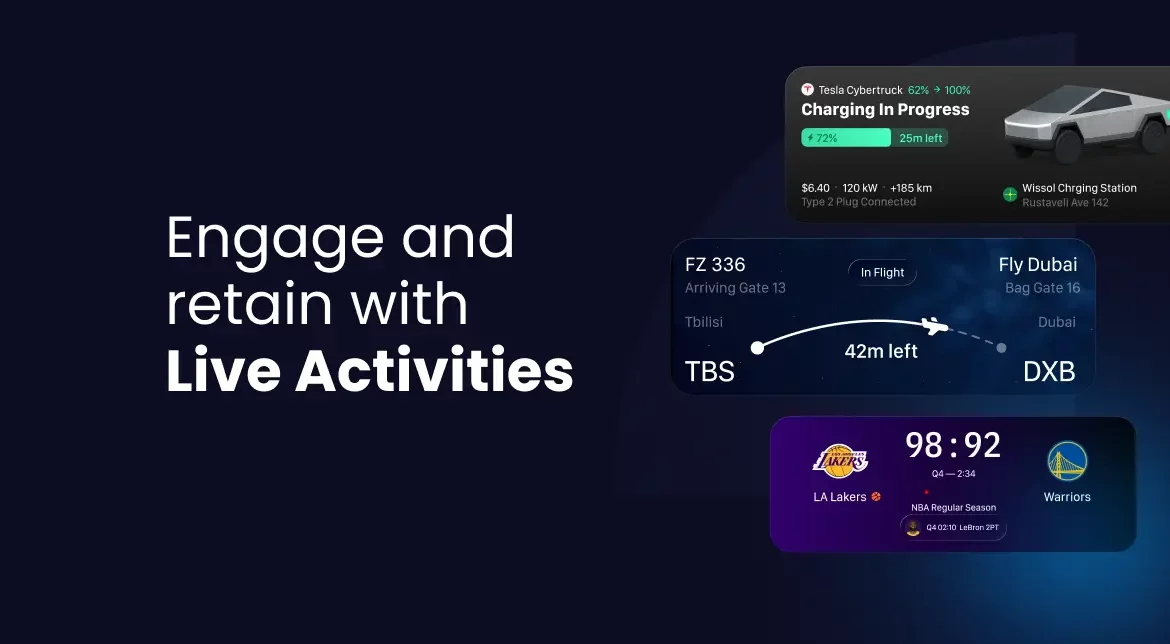
How Live Activities on iPhone increase app engagement and retention
Last update: September, 2026
TL;DR
◆ Live Activities on iPhone pay off when a task is time-bound and users are compulsively checking status. The post’s 10-question scorecard tells you if your app qualifies.
◆ Live Activities alone rarely cover the full customer journey. Brands almost always need at least one other channel, push or SMS, each with its own moment and timing as the status changes.
◆ Bringing Live Activities online needs a widget extension and a shared data model between app and widget before any campaign team can touch it.
◆ Implementing Live Activities can be harder than setting up push or email, but a customer engagement platform like Netmera handles token management and APNS communication automatically, so teams control it through API calls and track results in one dashboard.
One of the most underrated retention features doesn’t try to keep people in your app. It keeps them out of it. A delivery update, a live score, a payment confirmation: you don’t have to open anything to see where things stand. It sits there and changes on its own.
Live Activities on iPhone, one persistent surface on the Lock Screen with real-time progress, reduce friction while increasing engagement and retention. Users stay informed, your app stays visible, and the experience feels effortless.
Below: which industries benefit most from iOS Live Activities, and how to build a cross-channel strategy that coordinates Live Activities with push, email, SMS, and in-app messaging through an engagement platform with a built-in CDP.
What are Live Activities on iPhone, and why brands should consider them for engagement
Live Activities are widgets that appear on the iPhone Lock Screen, in the Dynamic Island, on StandBy, and in the Smart Stack on Apple Watch. Unlike push notifications that disappear after a tap, Live Activities stay visible and update in real time.
Apple’s own guidance caps them at eight hours of active use, and once the task ends, the system keeps the activity visible on the Lock Screen for up to four more hours before removing it. Apple introduced them in iOS 16 and expanded functionality through iOS 17 and iOS 18.
People glance at a Live Activity the way they’d glance at a clock, quick, frequent, and without breaking whatever they’re doing. This keeps your brand visible during high-intent moments without interrupting.
Not many customer engagement platforms support Apple Live Activity natively. You could integrate a separate tool, but that fragments your data and adds another vendor to manage. Netmera includes Live Activities alongside push, email, SMS, WhatsApp, and in-app messaging in one system, so interaction data flows into your segmentation and campaign workflows without additional integrations.
Three ways Live Activities increase retention
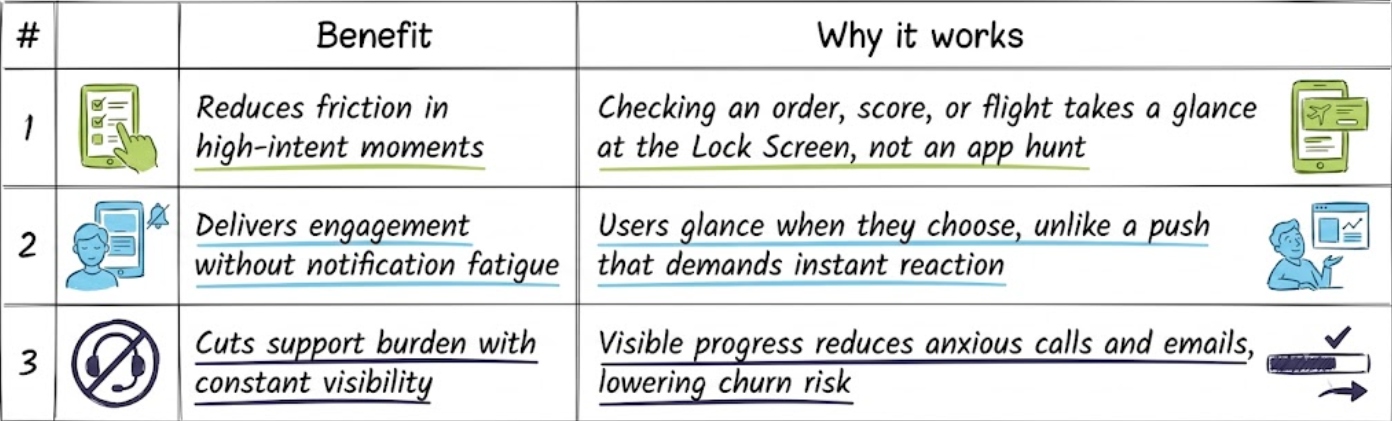
Reducing friction during high-intent moments
Checking an order, a score, or a flight no longer means unlocking the phone and finding the right screen, it means looking at the Lock Screen. Lower effort signals higher utility, which impacts retention.
Delivering engagement without notification fatigue
It’s all about user control. A push demands a reaction almost always the moment it arrives. Live Activities stay on the Lock Screen, letting users glance when they choose. Ideal for brand visibility without exhaustion.
Decreasing support burden through constant visibility
Logistics and delivery apps face constant support contacts from anxious customers. Live Activities make progress visible at all times, which reduces calls and emails to your team. When customers see where their order is, worry drops and churn risk decreases.
Live Activities apps: Retention use cases by industry
Different verticals use live activities in their apps to solve retention problems during high-intent moments.
Live sports and media
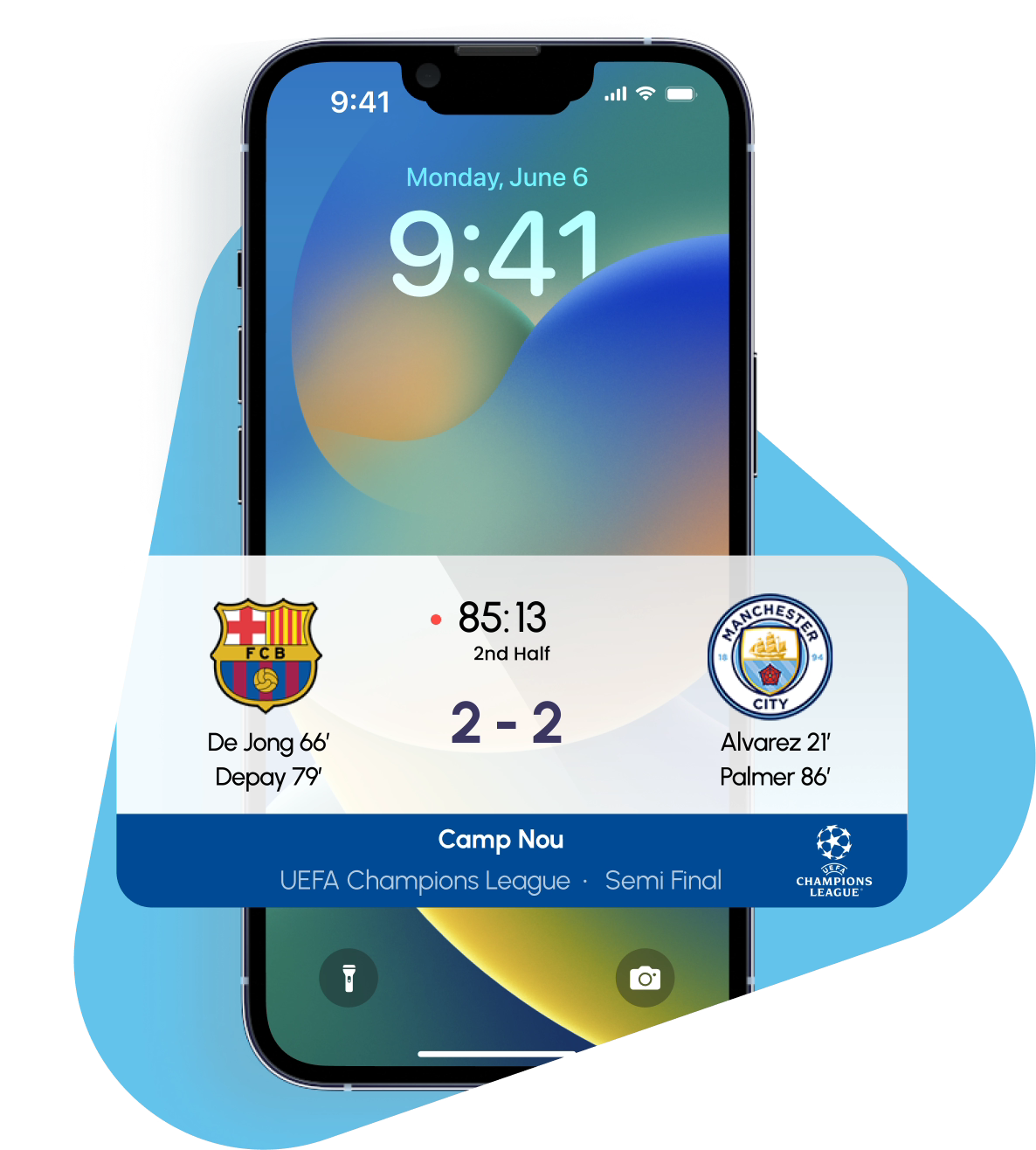
Problem: As fans refresh score pages constantly during games, they miss key moments while checking.
Live Activities solution: Users glance between plays without opening the app. Updates flow automatically as the game progresses.
For fans following more than one match at once, a single Live Activity can cycle through games showing goals, substitutions, and half-time transitions across all of them in one place.
Outcome: Higher engagement during live events and post-game. Users don’t have to open the app just to check the score, and that restraint earns real fondness for the brand.
Food delivery and logistics
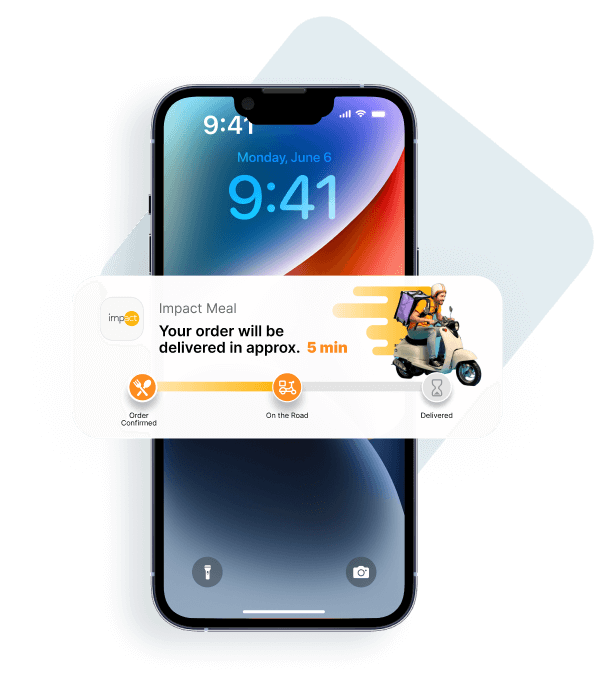
Problem: Users check order status multiple times, opening the app repeatedly. When updates delay, they call support. This creates operational burden and frustration.
Live Activities solution: Live tracking from kitchen to doorstep appears on one persistent surface. Users see progress without app opens or support contacts.
Outcome: Reduced support calls, higher satisfaction scores, users trust delivery windows.
Financial services and fintech
Problem: Users anxiously check transaction status, refresh payment confirmations, or watch crypto price movements.
Live Activities solution: Transaction progress and price alerts update without opening the app. Netmera makes it easy to segment users by transaction type or portfolio value, so you can target high-value customers with priority Live Activities updates.
Outcome: Reduced anxiety, faster awareness of time-sensitive changes, higher trust during critical financial moments.
Telecom
Problem: Customers call support to check on outages or technician appointments, and both create load during moments the customer is already frustrated.
Live Activities solution: Outage status moves through investigating, identified, fix in progress, and resolved. Technician appointments show scheduled, assigned, on the way, and arrived, with time window updates as they happen.
Outcome: Fewer support calls during outages, fewer missed appointments, and renewal or data pack reminders that don’t require exposing account details on the Lock Screen.
Travel and aviation
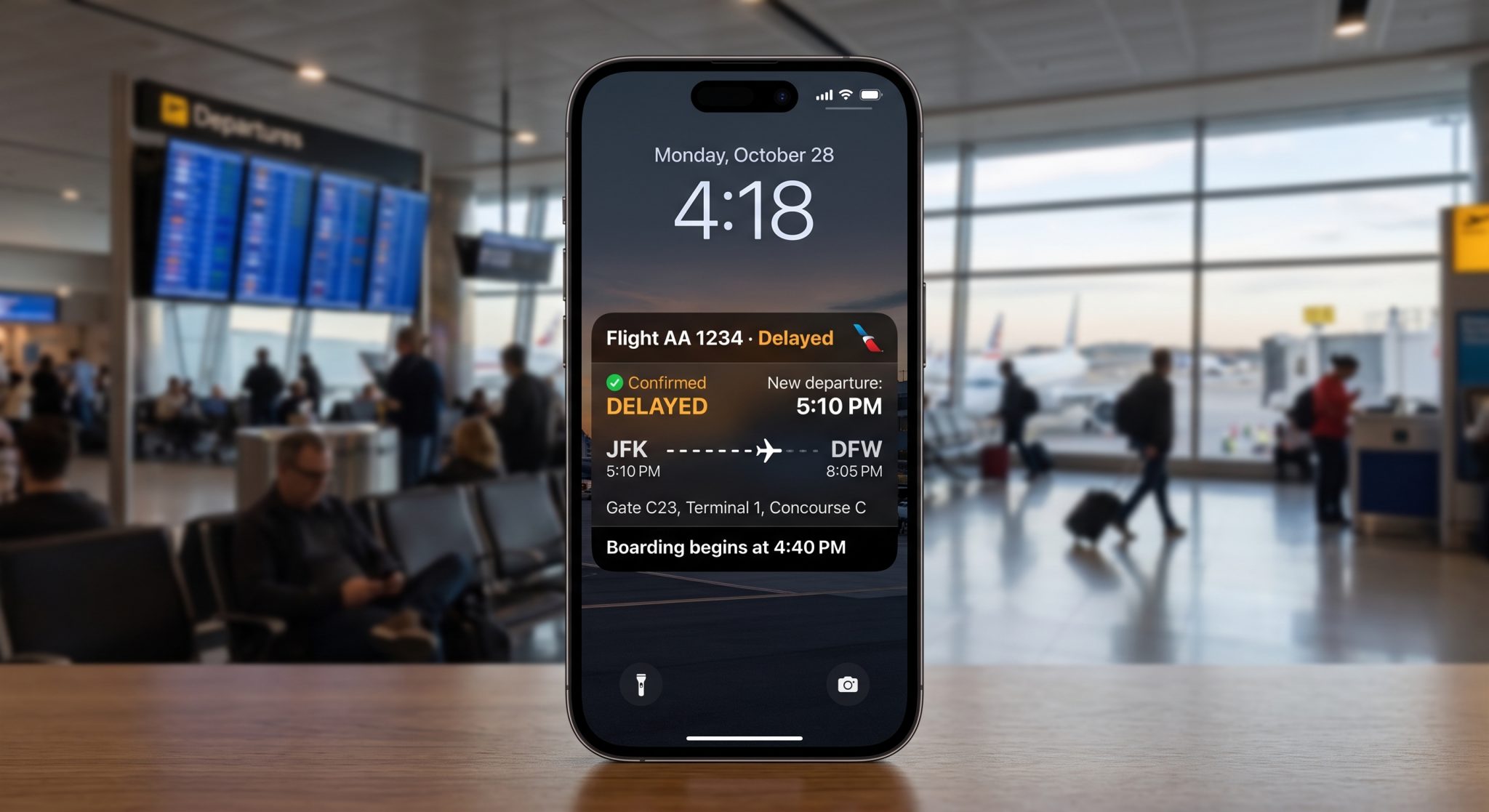
Problem: Travelers check flight status compulsively. Airport chaos increases anxiety when information feels unreliable or hard to find.
Live Activities solution: Gate updates, boarding calls, and delay notifications persist on the Lock Screen ready for travelers to check between security lines and coffee stops.
Outcome: Lower missed flights, fewer gate confusion incidents, travelers feel prepared and confident throughout their journey.
Fitness and health
Problem: Users lose motivation mid-workout, forget to track progress, and abandon fitness routines when they can’t see results building over time.
Live Activities solution: Real-time workout metrics stay visible without interrupting flow. Progress rings encourage completion through visual feedback.
The activity can also carry a pause or resume control, so someone can stop a workout mid-run without opening the app at all.
Outcome: Higher workout completion rates and long-term habit formation through consistent engagement during active sessions.
When to use Live Activities: a decision framework
Not every app needs iOS Live Activities. We’ve prepared a 10-question checklist to help you decide whether your use case fits.
Answer each question with “Yes” or “No”:
◆ Does the task have a defined beginning and end, ideally lasting 1 to max. 8 hours?
◆ Does the status change multiple times during this window?
◆ Do users open your app three or more times just to check status?
◆ Can critical information fit a glanceable format with minimal text or icons?
◆ Is the task initiated by a direct user action within the app?
◆ Is your industry logistics, telecom, sports, travel, fitness, or high-frequency finance?
◆ Does your backend handle token-based push updates?
◆ Are 30% or more of your active users on iOS 17 or later?
◆ Do you face high churn during the delivery or service phase?
◆ Can you deliver value without including promotional content?
Scoring:
Immediate priority. Live Activities are a competitive necessity.
Strategic advantage. Implementation likely reduces support costs and improves retention.
Re-evaluate. Push notifications might serve you better.
What doesn’t belong in Live Activities
Sensitive data like bank balances, medical results, or weight shouldn’t appear on the Lock Screen. People check phones in public spaces, meetings, and around family. Show a summary instead, a status word, a progress ring, an icon, and let the tap-through reveal the actual number once they’re back in the app. Promotional content and static information don’t belong either.
Beyond Live Activities: Building a complete engagement strategy across channels
Live Activities on iPhone work perfectly during active moments like an order in progress or a ride happening. But what about re-engagement when the task completes? What about users who disabled Live Activities in settings? What about Android users, who represent more than seventy percent of the mobile market?
Live Activities can’t handle post-completion follow-up like feedback requests, upsells, or guiding users to their next action. Complete retention requires coordinated messaging across Live Activities, push, in-app, SMS, WhatsApp, and email with automatic fallbacks based on device capability and user preferences.
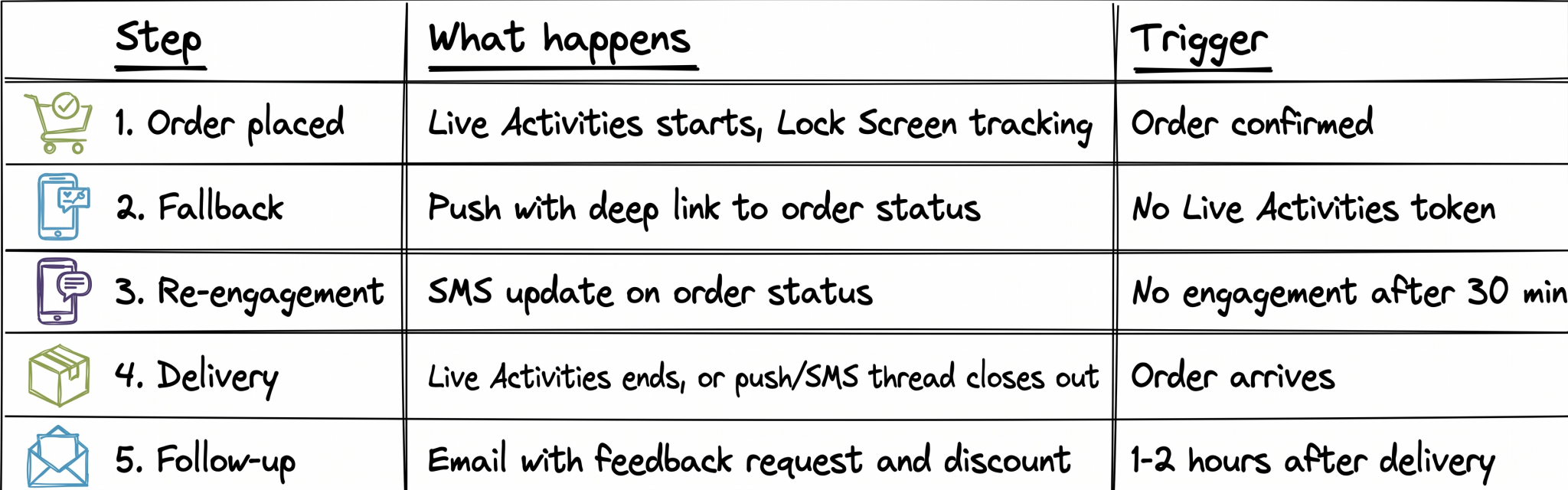
The scenario below is from food delivery. The channels and flow can shift depending on each business customer’s profile, user volume, and communication strategy. We drew this from multiple customers using Netmera for both Live Activities and other channels. Best practice is to prioritize the one or two channels your segments use to avoid possible message fatigue.
If Live Activities on
Live Activities start automatically, showing live tracking from kitchen to delivery. Users see order progress on the Lock Screen without opening the app.
If Live Activities off or Android
The system detects capability by checking whether a Live Activities token exists. When it doesn’t, an automatic fallback triggers: high-priority push notification with a deep link to the order status screen inside the app. Users still get updates, just through a different surface.
Coordinating this manually across tools means delays and mismatches. Netmera’s Journey Builder orchestrates push, email, SMS, and in-app from one workflow, with automatic fallbacks based on device capability and user behavior.
If no engagement after 30 minutes
Some users have push notifications turned off entirely, or the push simply doesn’t deliver. If SMS consent is on, that becomes the last channel: “Your order is 10 minutes away!” This reaches when neither Live Activities nor push can carry the update.
After delivery
An hour or two following the order delivery, an email goes out with a feedback request. The goal shifts from status updates to retention and repeat purchase encouragement.
Connecting Live Activities behavior to broader retention strategy
Someone who taps through to your app from a Live Activity demonstrates higher intent than someone who dismisses it immediately. Someone who disables Live Activities entirely might prefer email or need different messaging to stay engaged.
Traditional setups treat Live Activities as separate from your complete engagement strategy. The interaction data lives in one tool while your push analytics, email opens, and in-app behavior are found elsewhere. This fragmentation prevents you from acting on what Live Activities reveal about user preferences and retention risk.
With Netmera, you can track Live Activities engagement, push analytics, email opens, and in-app interactions in one platform. Build segments from that behavior and trigger follow-up campaigns. The data flows into your next journey without manual work or separate analytics tools.
Live Activities, push, SMS, and email: Best use case, why, and trigger
| Channel | Best for | Why | Typical trigger |
|---|---|---|---|
| Live Activities | live sports scores, food delivery tracking, transaction alerts, outage status, flight updates, workout metrics | persistent and glanceable, no reaction required | a time-bound task with changing status starts in the app |
| Push | cart abandonment, flash sales, re-engagement | demands a reaction the moment it lands | a specific, time-sensitive event just happened |
| SMS | delivery windows, OTP, appointment reminders | high open rates, reaches users without the app open | a short message needs guaranteed, immediate visibility |
| feedback requests, receipts, win-back, onboarding | higher content ceiling, read on the user’s own schedule | a task completes or a longer message is needed |
Live Activities best practices
Start and end with clear intent
Launch Live Activities only after a direct user action like placing an order or starting a workout. End immediately when the task completes, so stale information never stays on the Lock Screen.
Design for glanceability
Show one critical piece of information per view. Users should understand the update in 2 to 3 seconds without reading paragraphs.
Handle sensitive data carefully
Use progress indicators or summaries instead of specific numbers like account balances, medical results, or weight.
Optimize for both light and dark mode
Test in actual conditions. Poor contrast in a dark room leads to immediate dismissal.
Keep animations minimal
Animations should stay under 2 seconds. Reinforce status changes without adding overlapping elements.
Use interactive controls sparingly
A Live Activity can carry one direct action, such as pausing a timer or contacting a driver, but never more than one per view.
Update only when status changes
Unnecessary updates condition users to stop paying attention and increase disengagement. Don’t send a separate push notification to announce a Live Activity update either.
Set appropriate dismissal time
The system keeps an ended activity on the Lock Screen for up to four hours by default. Most tasks don’t need that long. Let summaries stay visible for 15 to 30 minutes if they provide value, then auto-dismiss to avoid Lock Screen clutter.
How Netmera makes Live Activities iOS easy to implement
A time-bound event starts in the app or backend. Netmera receives the request and hands it to Apple. Apple delivers the activity to the device, where the user sees it on the Lock Screen or Dynamic Island. Netmera keeps the activity updated for as long as the event runs, then ends it the moment the event is over.
One-time iOS SDK setup
Developers complete the initial integration, define the Live Activity structure, and register it with Netmera.
Control remotely via REST API
Product and marketing teams start, update, and end Live Activities through server-side API calls. Netmera handles token management and APNS communication automatically. Live Activities can also be sent in bulk, to all eligible users at once or to a specific segment or tag.
Track everything in one dashboard
Netmera tracks three system events across the Live Activity lifecycle: a start token event when the activity begins, an update token event when the push token changes, and a close event when the activity ends, whether the user dismissed it or the app closed it automatically.
Both appear in Analytics → Event Insight and on a specific user’s event history, alongside push, email, and in-app metrics.
What your iOS team needs first
Live Activities aren’t panel-only. Before Netmera can start, update, or end an activity, the app needs Live Activities support, a widget extension to render it, and a shared Live Activity model between the app and the widget.
Check our user guide for implementation details.
Live Activities drive retention by reducing friction during high-intent moments. They work best as part of a coordinated strategy across push, email, SMS, WhatsApp, and in-app messaging. Netmera unifies Live Activities with your other channels and tracking in one platform, so interaction data feeds directly into segmentation and campaigns.
FAQs about Live Activities
Live Activities are persistent widgets that appear on the iPhone Lock Screen, in the Dynamic Island, on StandBy, and in the Smart Stack on Apple Watch. They update for up to eight hours, showing real-time progress for a delivery, a ride, or a workout without a single app open.
Live Activities work best for time-bound tasks with changing status: food delivery tracking, live sports scores, ride-hailing updates, flight boarding notifications, workout metrics, and financial transaction progress. They reduce friction during high-intent moments when users repeatedly check status.
Live Activities cut down repeated app opens during status checking and keep the update visible without requiring a reaction, unlike a push. Persistent visibility keeps your brand top-of-mind during critical moments, reducing churn when customers are most anxious about progress or outcomes.
Live Activities work best as part of a coordinated strategy. They can’t handle re-engagement, post-completion follow-up, or Android users. Combine them with push, email, SMS, and in-app messaging with automatic fallbacks based on device capability and user behavior patterns.
Netmera handles token management, APNS communication, and tracking automatically. Teams control Live Activities through the REST API. Interaction data flows directly into segmentation alongside push, email, and in-app metrics in one dashboard without additional vendor costs.
Burcu Ulucay – Content Marketing, Netmera