Website personalization: Best practices for higher customer engagement
Last update: July 2026
TL;DR: Website personalization works as a compounding cycle: behavioral data informs segments, segments drive tailored experiences, results refine the next round. What accelerates it is removing friction between steps. When data collection, segmentation, delivery, and measurement run in one platform, visitor segments get more precise with every campaign. AI has entered that cycle too, AI has entered that cycle too, from search ranking and predictive audience building to campaign setup and in-context assistance.
A returning visitor lands on your homepage for the third time. They’ve browsed the pricing page twice, opened a mobile push notification about a free trial, and still left without converting. The page they see on that third visit? Identical to what a first-time visitor sees.
That happens because web channels rarely share data with mobile. Campaign activation sits in a different system from data collection. Teams rebuild the context they already have, campaign by campaign. The problem is almost always a martech stack that cannot keep up.
Website personalization is still what delivers relevancy to a visitor. It starts with four practices: behavioral targeting, device-aware content, cross-channel consistency, and continuous experimentation. We’ll cover each practice in concrete setup steps, using Netmera as the platform example throughout.
What website personalization means for customer engagement
A website personalization strategy works as a cycle: collect demographic and behavioral data, segment audiences based on actions and AI predictions, deliver seamless experiences across website and mobile, measure impact, then refine based on results.
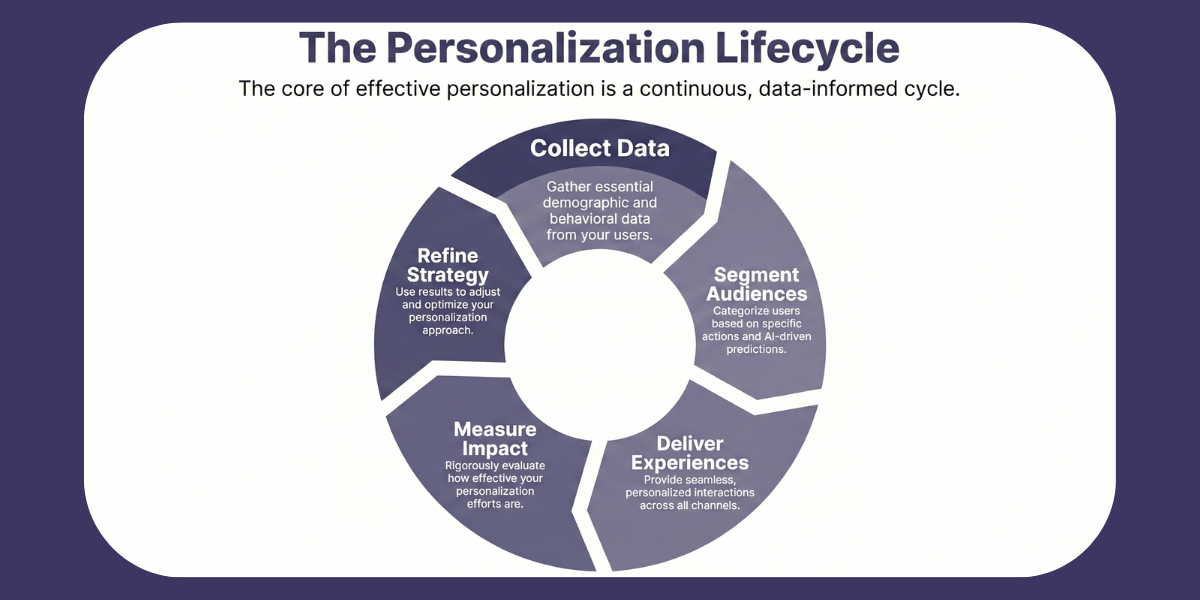
In our 10+ years of working with hundreds of companies, we’ve seen that true personalization happens when this entire cycle runs inside one platform without tool switching or IT dependency. And users notice the difference: 59% say shopping becomes easier when websites show personalized recommendations.
Benefits of personalized web content for customer engagement
– Visitors exploring content that matches their preferences spend considerably more time on site.
– Targeted messaging delivered when visitors show clear intent, such as spending time on pricing pages or adding items to cart, substantially increases conversions both on web and mobile.
– Experiences that respond to behavioral signals keep visitors from leaving immediately. A good example of this is to create landing pages tailored for different funnel stages.
– Personalized offers make consumers (actually about three-quarters of them globally) feel recognized, which drives repeat visits and long-term brand preference.
Best practices for web content personalization
There are several types of website personalization, and strategies vary by industry, site structure, and company size. Yet, four practices below consistently deliver across these variables.
Match messages to visitor behavior and intent
A visitor moving from product page to pricing to cart shows clear buying intent while someone returning to your site three times in two days signals sustained interest. Reference their previous actions, skip redundant explanations, and guide them to the next step.
First-time visitors, on the other hand, need trust and clarity. Show social proof, highlight what makes you different, and explain how your product works.
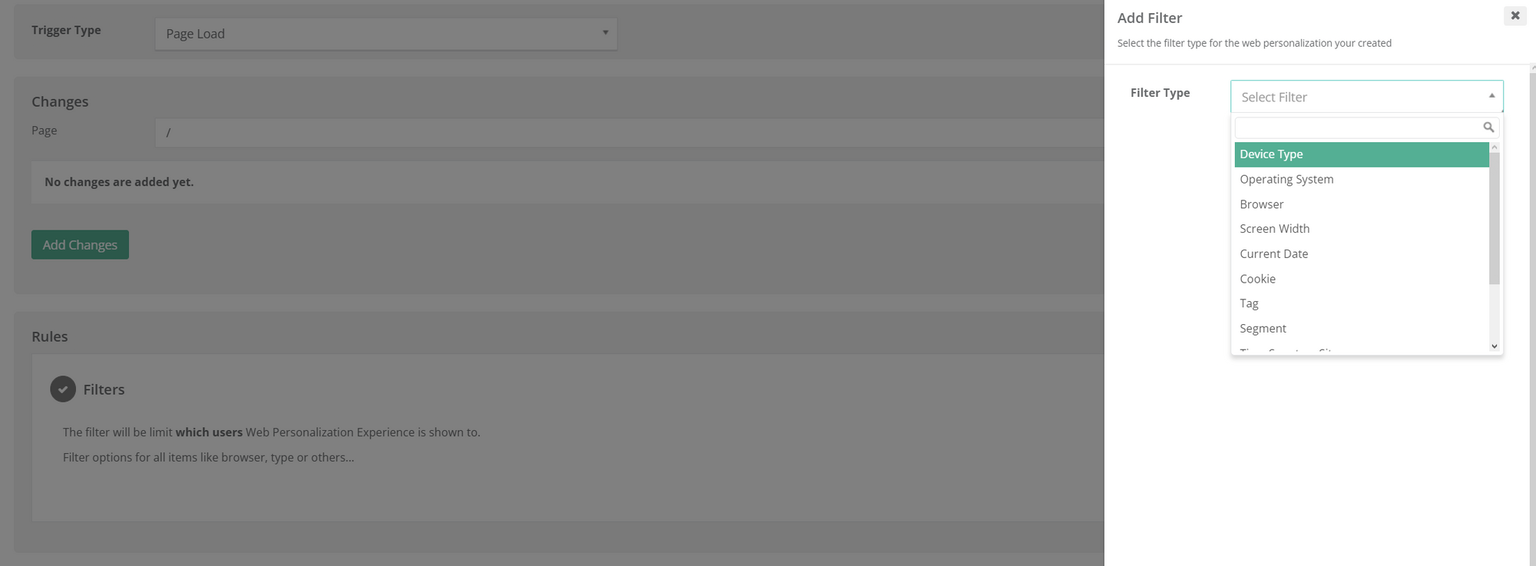
Once these behavioral patterns are in place, advanced filtering helps you act on them. Netmera makes this simple with behavioral filters that identify visitors based on intent and engagement patterns. For example:
– Set “Time Spent on Site” to a minimum of three minutes.
– Add “Cookie Tracking” to detect returning visitors.
– Layer “Page URL” filters to reach users browsing high-intent pages like pricing or checkout.
– Use “Segment” filters for higher precision, such as abandoned cart users or specific customer tiers.
Netmera’s Cookie filter lets you recognize return visits and tailor messaging. For a user on their third visit to your pricing page, you can show a “Welcome back” message with a clear path to start a trial.
Check our website personalization feature page for more information.
Tailor content based on device and browsing context
Start with device segmentation, then layer contextual data (screen size, browser capability, and location) to refine it.
Netmera’s Device Type filter segments users by mobile, tablet, or desktop. You can then define Screen Width parameters, and add Browser filters for cases where features behave differently across Chrome, Safari, or Firefox. Combine these with Location filters when geography influences the experience, such as showing nearby stores or adjusting language by region.
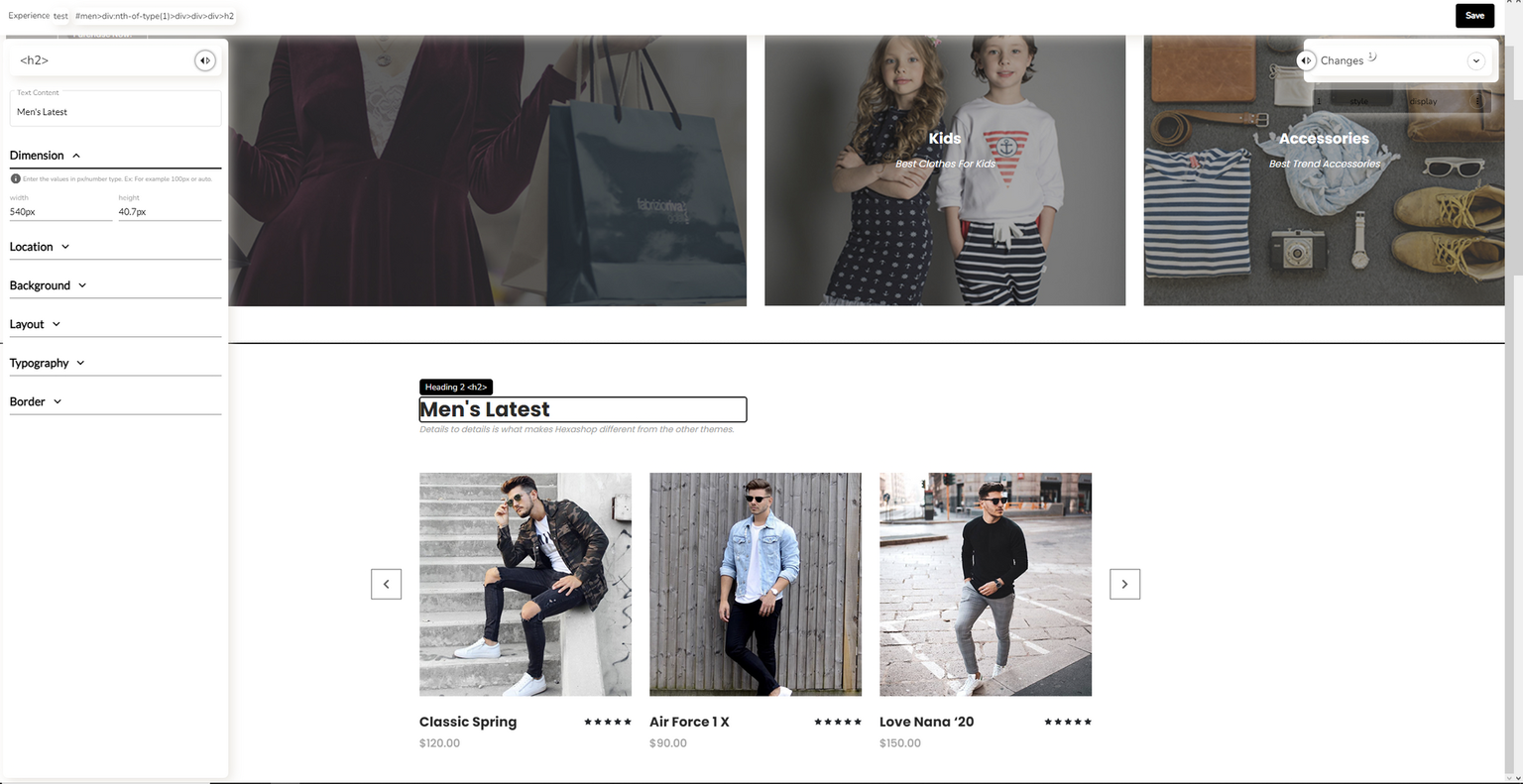
With this setup, mobile users with smaller screens encounter single-column designs and tap-friendly buttons, while desktop users see richer visuals and more detailed product information.
Keep your story consistent from click to conversion
Every campaign tells users something specific before they click. An email might promote a loyalty offer, while a web pop-up with spin-to-win wheel highlights new data plans. When visitors are on your site, the experience should continue that same story. If it doesn’t, interest fades fast.
You need to track web traffic to know exactly where users come from and what message brought them there.
Netmera gives teams the clarity to do this accurately:
Source URL filters capture Medium, Source, and Campaign parameters from referring links, showing which email, social media platform, or partner site directed the visitor.
Tag filters segment users by campaign type or past behavior, so messages match what previously engaged them.
As users are now engaged, don’t stop there. With Netmera’s no-code Journey Builder, teams design automated follow-ups based on data collected across campaigns and user behavior. A visitor who views a pricing page but takes no action can later receive a personalized web push or in-app message created within the same journey.
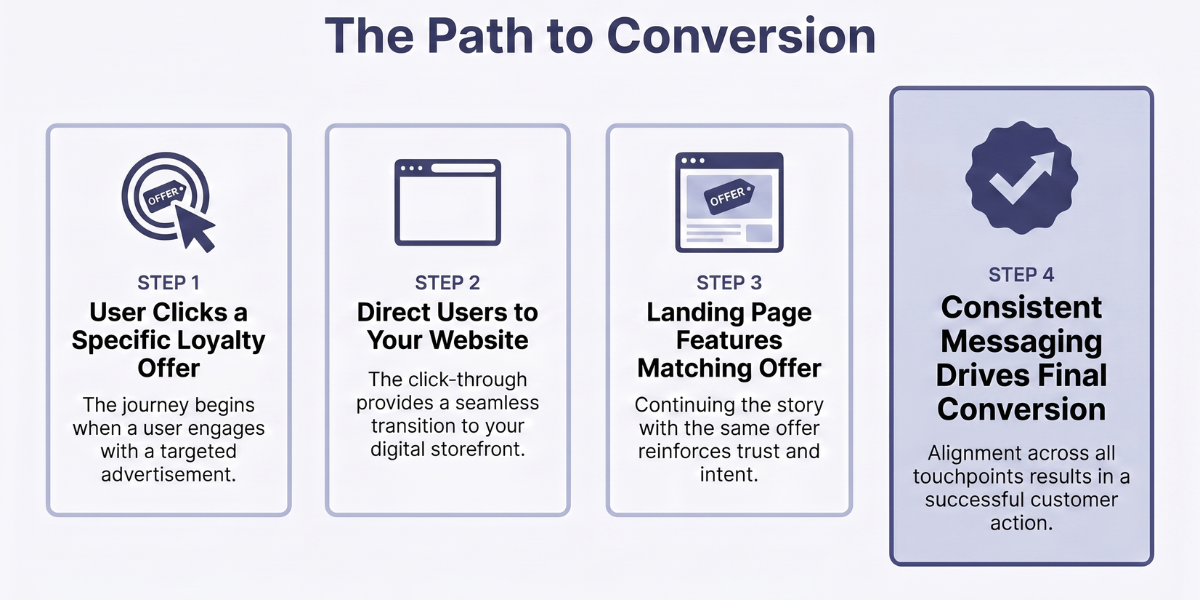
Some mobile users will need to install your app during the journey, and that’s why we developed deferred deep linking specifically to be used across owned channels. Someone clicking “20% off this weekend”, for example, expects to see that offer. The experience stays consistent from initial click through app download to final conversion.
Run experiments and use data to improve results
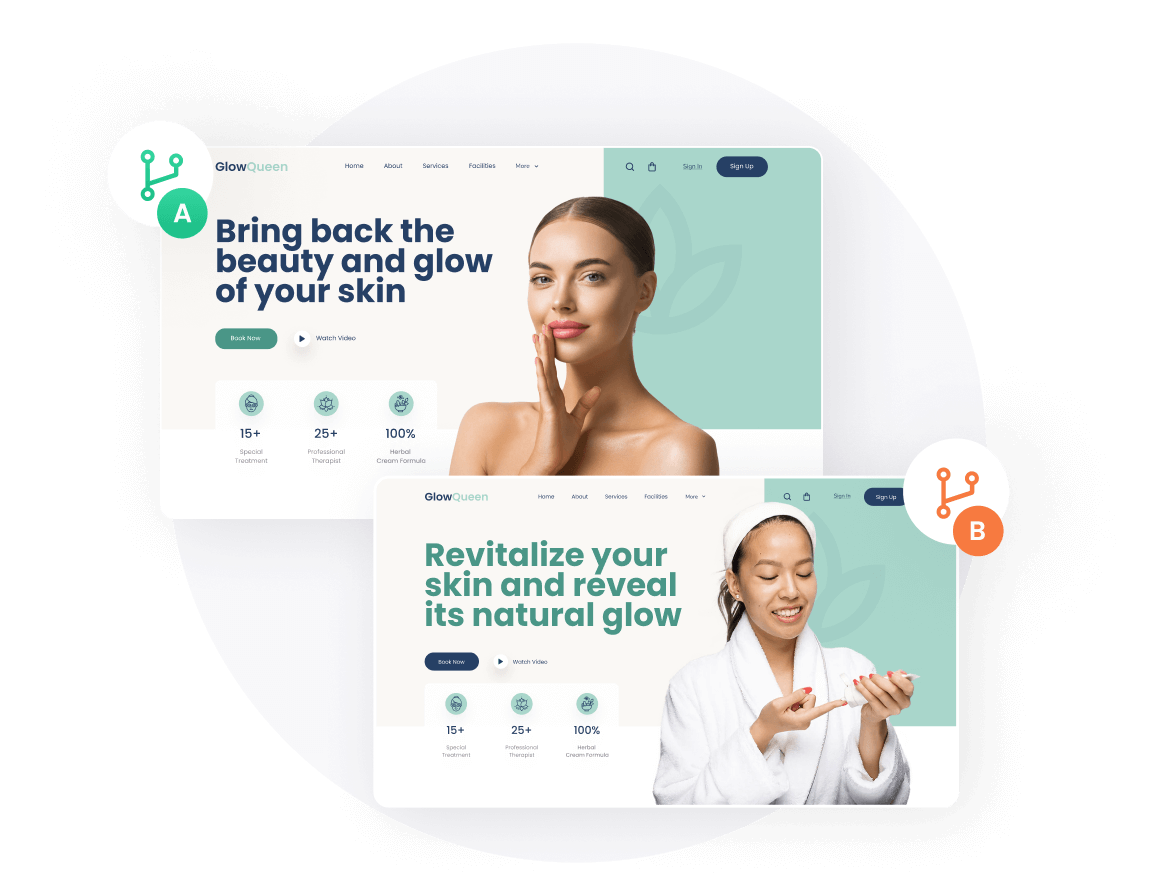
Start by defining the question you want to answer. Customer stories or feature highlights – which message converts better for new visitors? Create two versions and let data decide.
Netmera helps teams combine experimentation and feedback within one platform:
– Testing and Experimentation: Set up A/B tests for any on-site element, from layout and visuals to content blocks and calls to action. Track performance metrics in real time, including bounce rate, session duration, and conversions. Use clear success criteria before launch to ensure results guide future decisions.
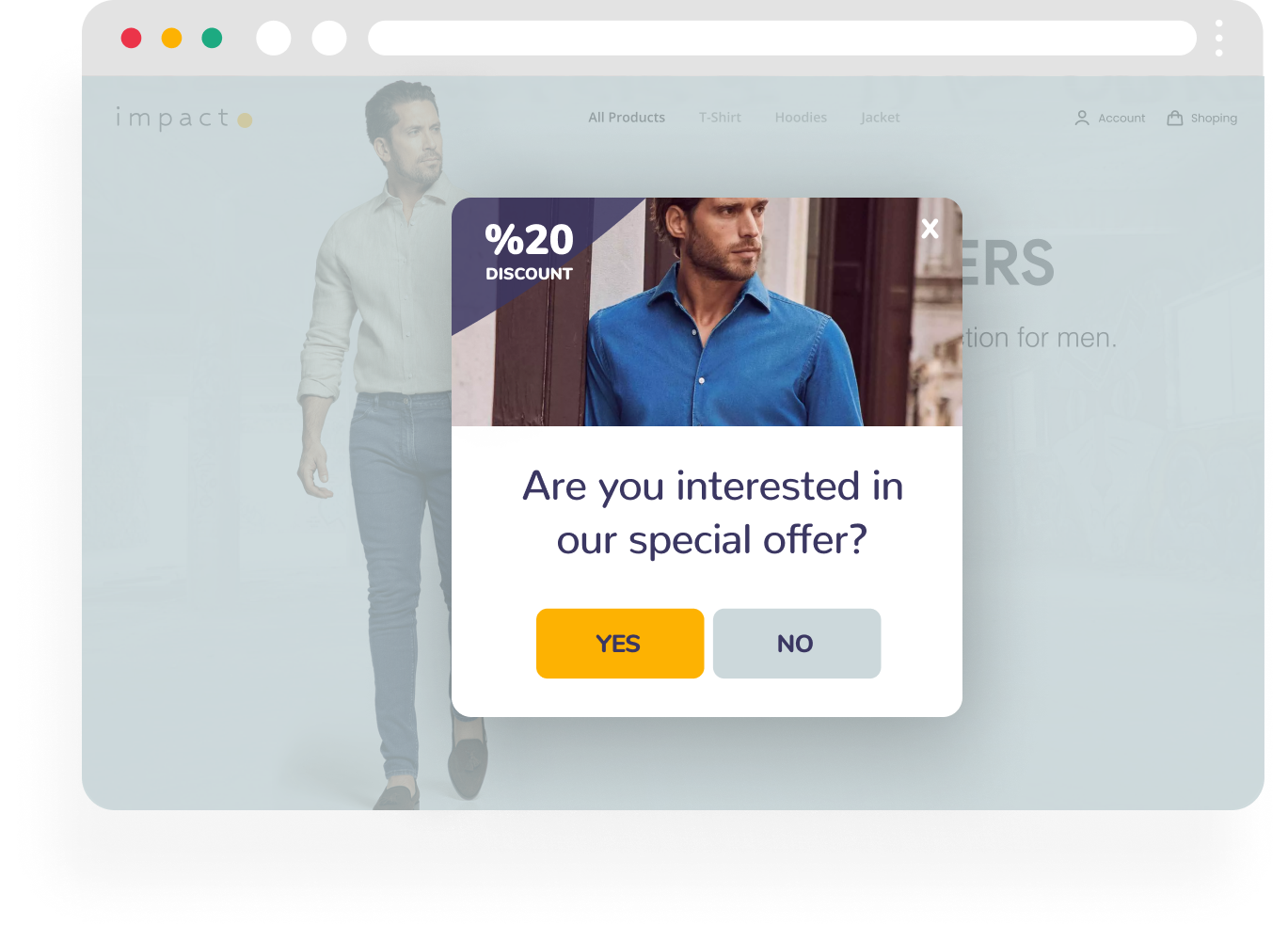
– Survey and Feedback Tools: Add quick feedback prompts to capture user insights directly. A short exit survey that asks “Are you interested in our special offer?” or “What did you look for here?” uncovers motivations and obstacles that numbers alone can’t show. Connect responses to behavioral data to see which user types share similar opinions.
Once a clear winner emerges, refine it further and test the next idea. With each round, you strengthen personalization and web retention which increases the impact of every campaign.
How to get started with personalization, using Netmera
While our user guide walks you through creating personalized web pages with Netmera, here’s a concise overview:
– Go to your Netmera Panel and open Web Tools → Experiences → Web Personalization.
– Click “Publish a New Experience”.
– Give your experience a name and set filters in “Setup” and “Rules”.
– Add any changes in the “Rules / Changes” section.
– Customize the content to ensure it appears as you want.
– Click “Save” and “Done” to apply the experience immediately to your web page.
Clone successful experiences to test variations. Stop and edit anytime based on performance data. The entire process takes minutes because everything happens in one platform without code changes or developer involvement.
Steps to set up web personalization with AI
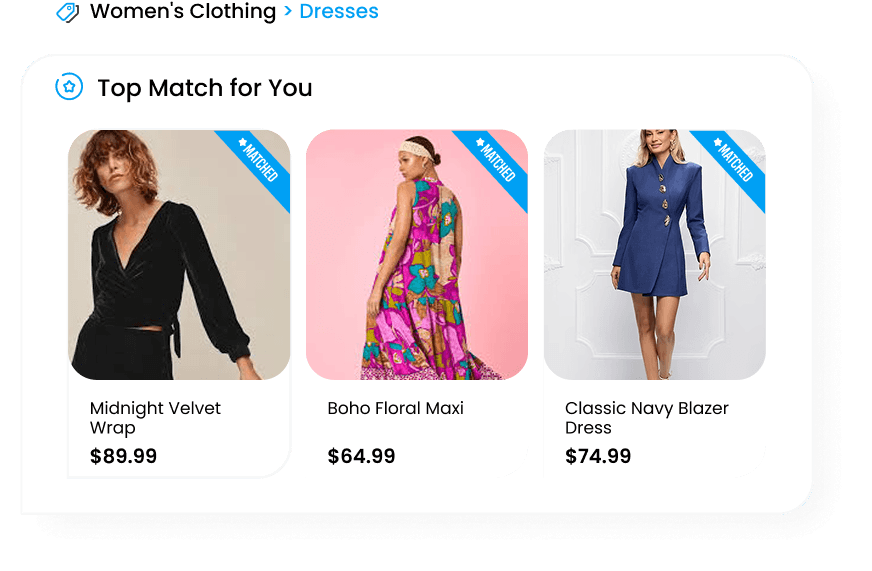
AI enters the personalization workflow at four points: search and browse ranking, predictive audience building, agentic campaign setup, and in-context assistance through an MCP server connection.
Start with what visitors see when they search or browse your catalog. A visitor who consistently browses running gear sees athletic products ranked higher on their next visit. Someone whose behavior signals disengagement gets a reconfigured experience before they have a chance to leave. Netmera’s AI site search and browse does this automatically across your catalog without requiring manual rule updates.
Predictive AI identifies visitors with high purchase intent or rising churn risk before they act on either. Teams build audiences around those signals and deliver personalized experiences to the right visitors at the right moment, without waiting on analyst queues.
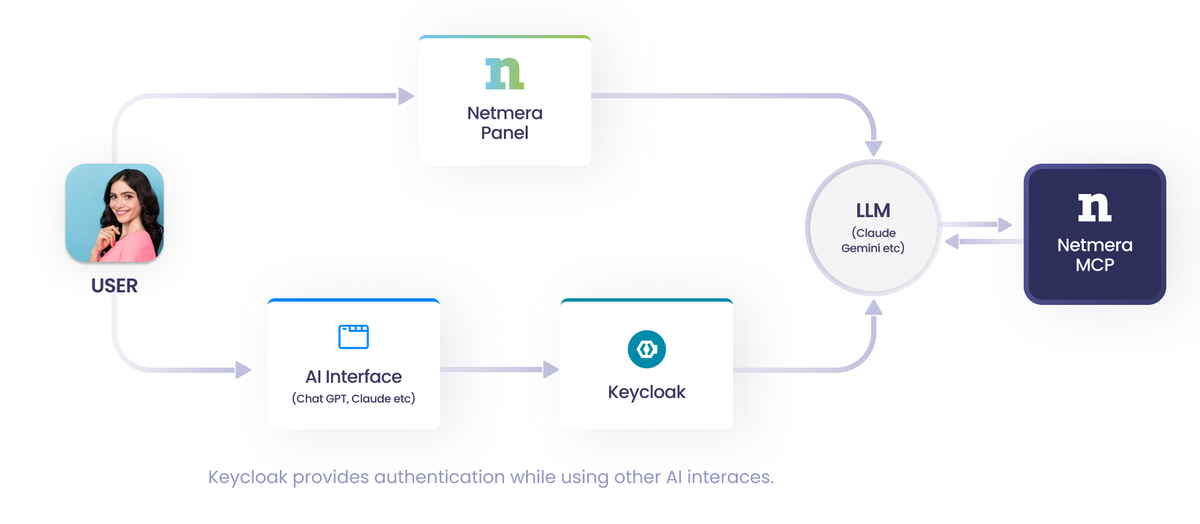
Once audiences are defined, agentic AI takes the operational load off campaign setup. Brief it in plain language (which segment to target, what the offer is) and it drafts campaign copy and sets up the configuration for your review before anything goes live.
For teams already working inside AI assistants, Netmera’s MCP server connects to tools like Claude or ChatGPT. Query campaign data, request segment definitions, or trigger workflow steps from the AI environment you already use, without switching between systems.
Website personalization examples for e-commerce
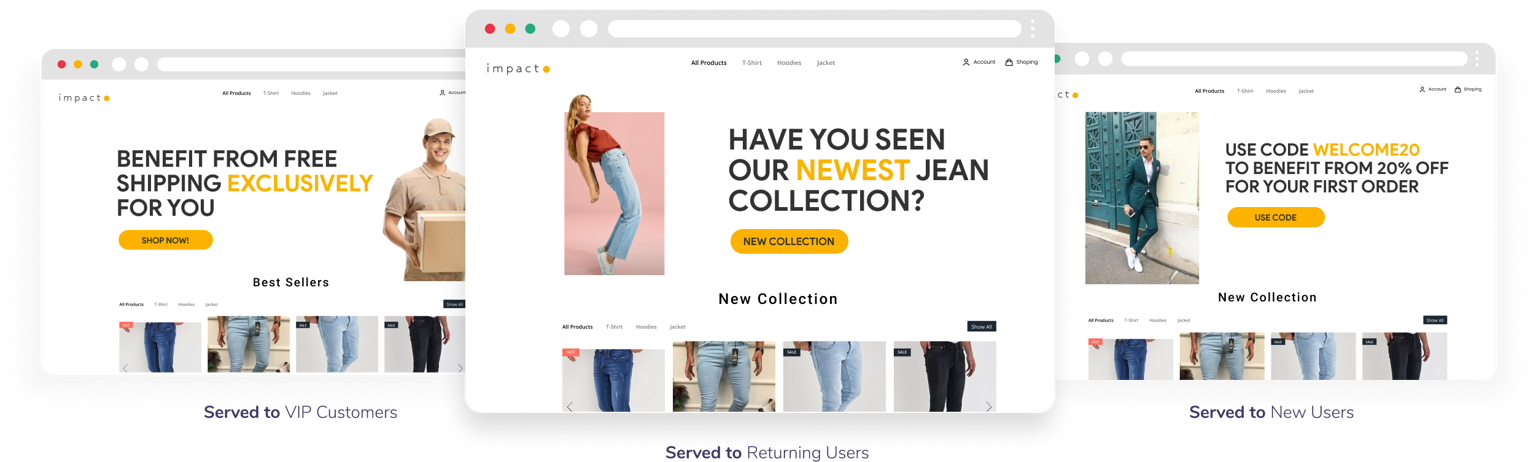
Category browsing
When someone views three products in your casual pants section, trigger a personalized web pop-up or banner offering 20% off their next purchase in that category. Track category exploration patterns and adapt your on-site messaging in real time.
Cart abandonment
Someone added items but didn’t buy them. Personalize the entire recovery flow: show those exact products with stock status updates through web push notifications, and use web pop-ups to surface related items they haven’t seen yet.
Location-based messaging
A customer browsing near your store sees different content than someone shopping from home. Web banners can highlight in-store pickup options and local inventory. Product recommendations adjust based on regional preferences and seasonal differences.
Loyalty program integration
Display point balances dynamically through on-site banners as customers browse. Show them how close they are to their next reward tier. Web pop-ups can recommend products they can redeem using accumulated points.
The common thread across all four: you’re reading customer actions and adjusting what they see accordingly.
You can apply all these strategies through Netmera’s website personalization tools including web push notifications, web pop-ups, banners, and surveys. The platform allows you to collect and manage data, segment, deliver campaigns and track performance, so you’re managing web and mobile engagement from one platform.
How to measure website personalization effectiveness
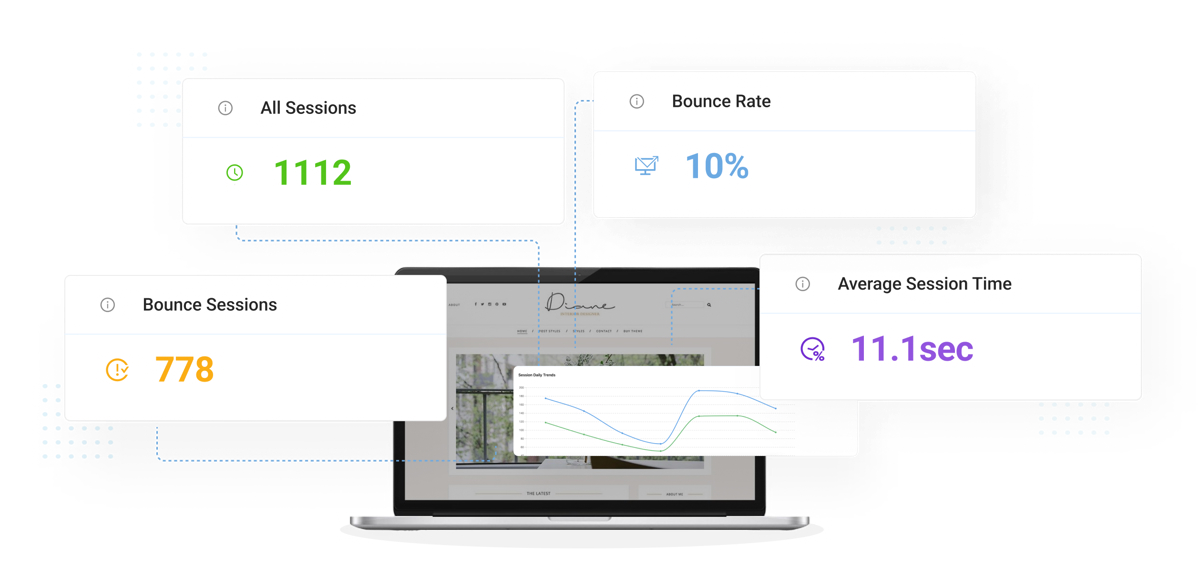
Below is a summary of what you can monitor with Netmera’s web analytics components.
– User and device tracking: See how personalization performs across mobile, tablet, and desktop to refine experiences for each context.
– Page views and session data: Identify which personalized pages keep visitors engaged and where they drop off.
– Bounce rate comparisons: Compare personalized experiences against control groups to validate what actually works.
– Conversion tracking: Connect personalization to goals like form submissions, purchases, or trial signups.
Netmera tracks visitor behavior automatically through tagless data capture without needing developers, which allows measuring results the moment experiences go live.
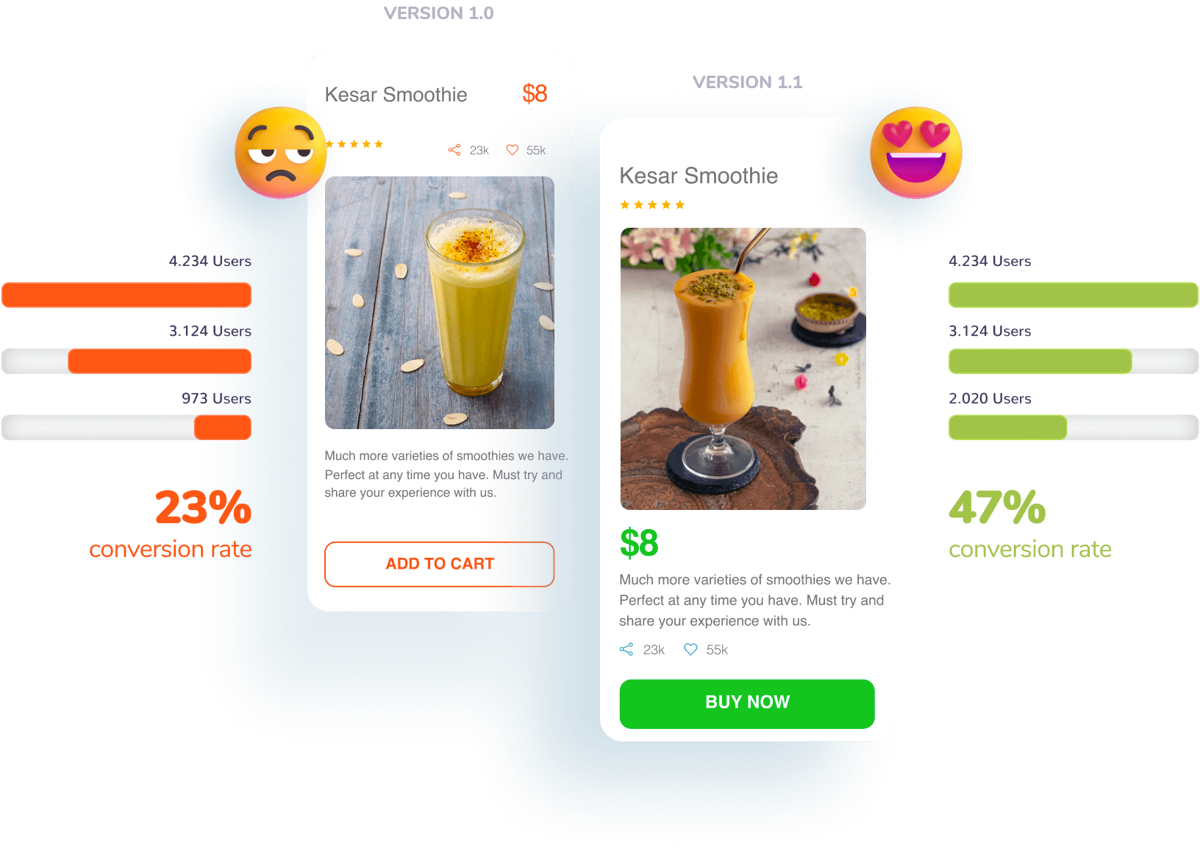
Funnels reveal exactly where visitors drop off in multi-step journeys, so you can track the complete path from landing page to conversion, identify friction points, and see which personalization changes move users through each stage.
Apply these practices to your website strategy
Netmera started as a mobile-focused omnichannel customer data & engagement platform, today processing over 30 billion behavioral data points and sending 30 billion notifications monthly. Major brands across finance, fintech, telecom, e-commerce, and media grew their mobile channels using our capabilities.
See how these brands achieved success and continue to grow in our case studies.
Customers told us their web personalization and tracking tools couldn’t match what they had on mobile. They wanted seamless, connected experiences across both channels. Brands running Netmera’s web engagement stack get behavioral targeting, A/B testing, and cross-channel consistency on the web, built on the same foundation as their mobile setup. All without code requirements.
Using more tools than your team can effectively manage creates fragmented data, misaligned campaigns, and vague priorities. With Netmera handling mobile, web, or both based on your needs, your data, audience segments, and campaign performance stay unified in one system.
See how these practices work in your environment. Schedule a demo to explore Netmera’s website personalization capabilities.
FAQs about website personalization
Web personalization adapts site content based on visitor behavior, demographics, and preferences. Platforms collect data like browsing history and device type, then use it to show relevant messages, product recommendations, or offers automatically.
Visitors who see content matching their interests stay longer and convert more. Personalization removes generic messaging and friction, showing each person what matters to them based on their actions and stage in the buying journey.
Collect behavioral and demographic data, segment audiences by actions or predictive signals, deliver tailored content across channels, then measure results and refine. The cycle runs continuously, with each campaign informing the next.
Return visitor recognition, cart abandonment recovery, device-based layout adjustments, location-based messaging, loyalty program integration, and campaign-source continuity where the offer a visitor clicked on stays consistent through to conversion.
Website personalization software typically covers behavioral data collection, audience segmentation, content delivery, and performance tracking. Netmera combines all of these in one platform: customer data, web pop-ups, banners, web push notifications, A/B testing, and a no-code journey builder. Teams run and measure personalized experiences without switching between tools.
Not with no-code platforms like Netmera. Marketing teams set behavioral triggers, create audience segments, and launch personalized experiences through visual interfaces. Changes go live in minutes without code deployment or IT tickets.
Track bounce rate, session duration, and conversion rate for personalized experiences versus control groups. Monitor pageviews, drop-off points in funnels, and revenue attribution to see which personalization strategies actually improve business outcomes.
Burcu Ulucay – Content Marketing, Netmera