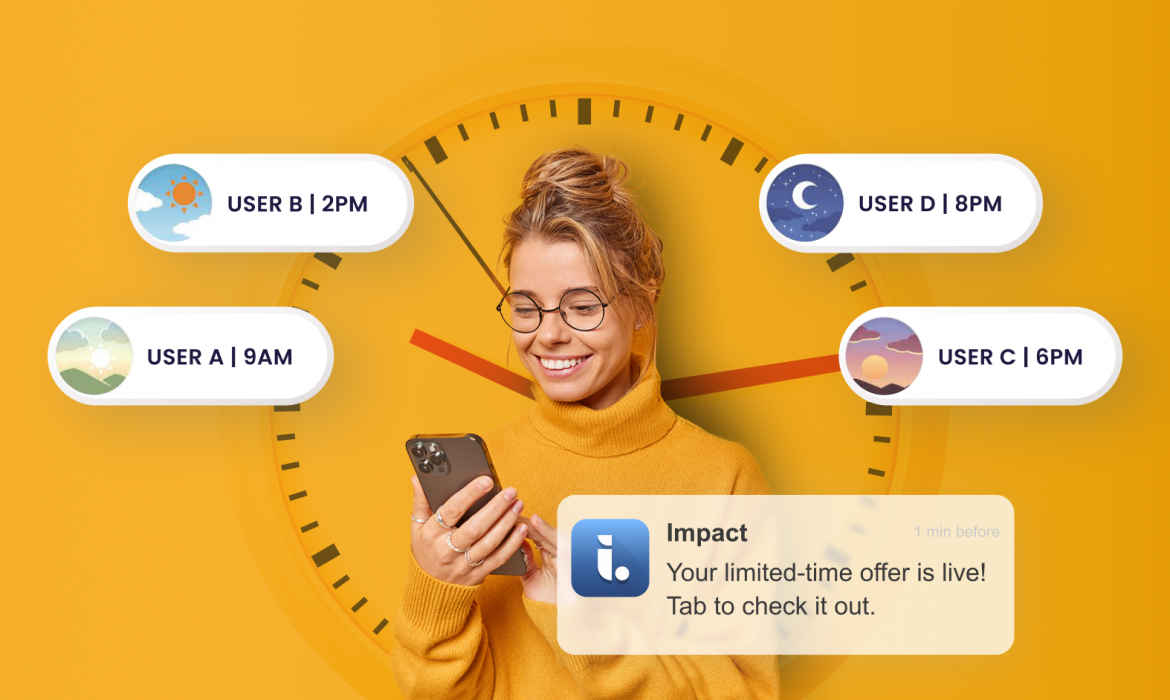
AI optimization: Choosing the best push send time based on user behavior
Last update: July 2026
TL;DR: Even the best campaign underperforms if it reaches users at the wrong time. Netmera’s Best Time Delivery analyzes each user’s last 60 days of in-app activity to automatically send push notifications at their individual peak engagement hour, different for each user, each day of the week. Set it once, and every message lands when each user is most likely to engage.
Your campaign had the right audience, the right offer, and even a 12% click-through rate. The next one with the same segment, stronger visuals, and an improved message only reached 4%. Everything else looked identical on the dashboard: same send time, same channels, same strategy.
Let’s figure out why this happened. Campaign A reached users during their peak engagement windows. Campaign B, however, went out at 2 PM to people who usually open notifications after 9 PM or hit early risers at midnight.
Even the best campaign can lose impact when timing is off. Aggregate data hides these individual timing; you see “sent at 2 PM” but miss that half your audience isn’t available then.
That’s where Best Time Delivery, Netmera’s AI-powered feature for choosing the best push send time for each user, comes in. Instead of using one global delivery time, it automatically determines the optimal hour to send a push notification for each user — every day of the week — so your message always arrives at the perfect moment.
Why send time matters for mobile engagement
Send time optimization is one of the highest-leverage levers in mobile engagement as even a few hours can make the difference between a conversion and a missed opportunity. A user who ignores a message at 9 a.m. might eagerly open it at 8 p.m., when they’re relaxed and scrolling through their phone.
According to a VWO Engage survey via Business of Apps, 39% of users say push notifications disturb them at the wrong time, and 53% find them outright irritating. 32% of shoppers say message timing is a top-three reason they’ll continue shopping with a brand, up from 25% in 2025.
Getting the content right matters, but sending it at the wrong moment can undo all of it.
Best Time Delivery completes the personalization puzzle because you reach users when they are ready to engage. For marketers, CX leaders, product managers, and app owners, this means getting more results from the same budget by eliminating wasted sends and truly resonating with their users.
How to implement Best Time Delivery to your campaigns with Netmera
Activating Best Time Delivery in your push campaigns is simple and fully automated once enabled.
1. Create or edit a push campaign
Start by navigating to the Campaign Scheduling step within your campaign setup.
2. Select best time delivery
In the Delivery Time section, choose Best Time as your delivery option. This allows Netmera’s AI to determine the optimal send hour for each individual user across both mobile and web push campaigns, based on their behavioral data.
3. Adjust fallback behavior (optional)
You can customize how the system behaves when the user’s calculated best time has already passed:
– Enable “Send Instantly if Best Time Has Passed” to deliver the notification immediately if the optimal time window has already expired.
– Leave it disabled if you prefer to skip users whose eligible send time has passed, ensuring only timely deliveries.
4. Finalize and publish
Once everything is set, review your configuration and publish your campaign.
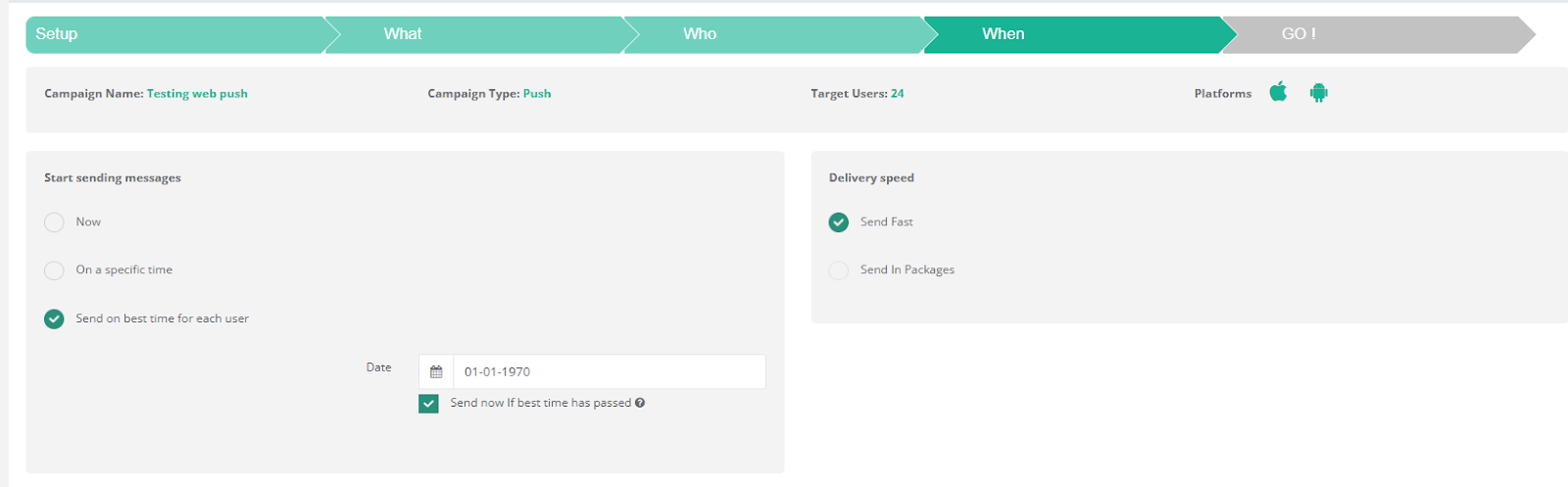
Netmera’s interface shows the setup for a push notification campaign, including scheduling options for delivery, with a focus on “send on best time for each user”.
From this point, Best Time Delivery automatically manages timing for each user, so every message is delivered at the right moment.
For more details, check our User Guide.
Best Time Delivery: Key terms and definitions
| Term | Definition |
| Time in app | The event type used to measure user time within the last 60 days to calculate best times. |
| AM best time | The hour between 00:00 and 11:59 when the user is most active. |
| PM best time | The hour between 12:00 and 23:59 when the user is most active. |
| Daily best time | The single hour (between AM and PM peaks) when the user is most active for that weekday. |
| App global best time | The hour of the day when most users are active for that weekday. Applies when user data is unavailable or if all AM/PM or daily best time periods have passed for the user. |
| Send instantly if best time has passed | A campaign setting that delivers messages immediately if a user’s calculated best times and app global best time have already passed. |
| Quiet hours | Time periods during which push notifications should not be sent. All best times are ignored during these hours. |
Four different industries, four different stories of perfect timing
Every user follows a different rhythm. Netmera’s Notification Delivery Logic ensures each of these users receives messages at the time that fits their unique pattern using a clear, step-by-step hierarchy powered by its AI features. To see how send time optimization plays out in real life, here are four professionals with different schedules and what Best Time Delivery does for each of them.
The morning scroller (e-commerce manager)
Selin manages an e-commerce app that sells lifestyle products. Every morning around 8:30 a.m., before diving into meetings, she checks the app dashboard and reads customer reviews.
When a campaign is scheduled, Netmera identifies her daily best time and if the campaign timing aligns with that window, the notification is sent exactly at that hour.
That’s why Selin sees the new “Morning Flash Sale” notification right as she’s sipping her first coffee and engagement follows naturally.
The evening browser (finance professional)
Robert works in financial consulting, and his days are packed with calls, reports, and deadlines. By the time he finally checks his phone, it’s usually after 9 p.m.
When the campaign goes out earlier in the day, his daily best time has already passed. But Netmera spots that his PM best time is still active, so the notification is sent late in the evening, exactly when Robert’s scrolling through apps to unwind.
The occasional traveller (travel blogger)
Emily is a travel content creator who’s always on the move — boarding planes, exploring hidden cafés, or hiking off the grid. Because she travels so often, she hasn’t opened the app in over two months. With no recent activity data available for her weekday, Netmera uses the app global best time, the hour when most users are active to deliver her notification.
Even though Emily’s personal rhythm is unpredictable, the message still lands at a statistically optimal time for her region, giving the campaign a fair chance to reengage her when she’s back online.
The missed window (EdTech entrepreneur)
Kerem runs an education startup and rarely checks his learning app during busy weekdays. By the time the campaign runs, his daily, AM, and PM best times have already passed.
In this case, Netmera won’t deliver the notification unless the fallback behavior is enabled.
If “Send Instantly if Best Time Has Passed” is active, the message goes out immediately, ensuring no opportunity is lost even for users like Kerem who live by unpredictable schedules.
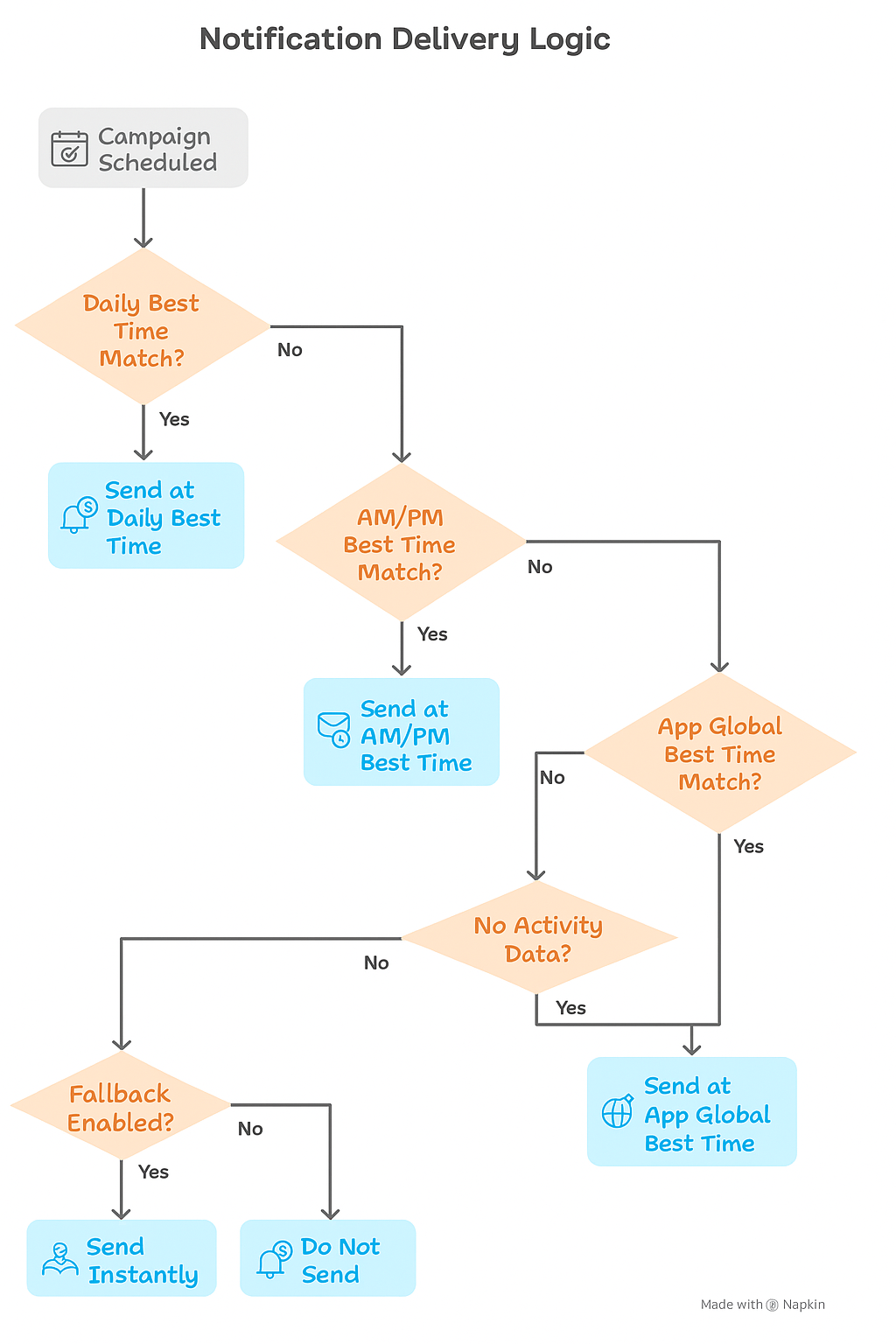
This flowchart illustrates the notification delivery logic, prioritizing daily, AM/PM, and app global best times, with a fallback option
So behind the scenes, each of these cases follows the same underlying logic
Daily → AM/PM → Global Time → No match → Fallback. Your notifications reach users when they’re most likely to engage, or wait for a better moment instead of disrupting them.
How Best Time Delivery works with Netmera’s other customer engagement capabilities
Today’s customers move fluidly across channels, and they expect the brands they love to keep up. Research from McKinsey finds that more than 80% of consumers rely on multiple channels when researching or buying a product. Meeting them across those channels consistently, and at the right moment, is where timing and omnichannel engagement work together.
Netmera’s AI-based Predictive Segments use behavioral data from events like purchases, clicks, and notifications to predict future user actions and group audiences according to both their interests and your business goals. Tagless Data Capture automatically tracks and records user behavior like page transitions and views on mobile and web, feeding that data into your segments with almost zero development work. Journey Builder then takes those segments and turns them into automated, multi-step engagement flows across every channel you need, with each step triggered by real user behavior.
Timing those steps correctly is where Best Time Delivery comes in. It automatically determines the optimal hour to send each push notification so your message reaches users when they’re most likely to engage. This is push message optimization driven by AI, where behavioral data replaces guesswork and fixed schedules. You can then compare open and click rates against fixed-time campaigns directly in Netmera’s standard push reports to measure the impact.
Using Netmera’s omnichannel customer engagement platform, you achieve consistent messaging across push, web, WhatsApp, SMS, and email.
The result is a full engagement stack where audience intelligence, journey orchestration, and send time optimization work as one system rather than separate tools.
See how much engagement you’re leaving on the table. Get a demo.
FAQs on AI time optimization for push campaigns
How often is Best Time recalculated?
Best Time is recalculated continuously using the last 60 days of Time in App data. As user behavior evolves, their optimal delivery times update automatically — no manual action required.
Does Best Time work the same for all weekdays?
No. Best Time is calculated separately for each day of the week. A user’s most active hour on Monday may differ from Friday, and Netmera always uses the most accurate time for that specific weekday.
What happens if a user has no activity data?
If a user has no recorded activity in the past 60 days, their personal best time can’t be calculated. In this case, the App Global Best Time is used as a fallback. If no global time applies, the user is skipped unless the “Send Instantly if Best Time Has Passed” option is enabled.
What if the calculated best time falls within quiet hours?
If a user’s best time (Daily, AM, PM, or Global) falls within defined Quiet Hours, the message won’t be sent at that time. If no valid alternative remains, the user is skipped unless “Send Instantly if Best Time Has Passed” is active and the current time is outside quiet hours.
Can I use Best Time with other scheduling options?
No. Best Time is a delivery-time setting, not a campaign trigger. You must choose either a fixed delivery time or Best Time. When selected, Netmera automatically handles delivery timing for each user.
Does Best Time affect reporting?
No additional reporting is created for Best Time. Deliveries made using Best Time appear in standard push campaign reports, and you can compare open or click rates with fixed-time campaigns to evaluate performance.
Is Best Time available for all campaign types?
Currently, Best Time Delivery supports mobile push and web push campaigns. It’s not available for SMS, Email, or other channel types.